Every new hire starts the same way. Someone needs their address, their phone number, who to call in an emergency, and which team they are joining. Without a standard form, that information arrives in five separate emails and ends up in three different places.
An employee information form solves that. It gives you one structured way to gather the same details from every employee.
In this guide, I’ll give you a free employee information form template in three formats, a completed example to compare against, and the part most template pages skip entirely: what should happen to the information once you have it.
Employee information form template: free download
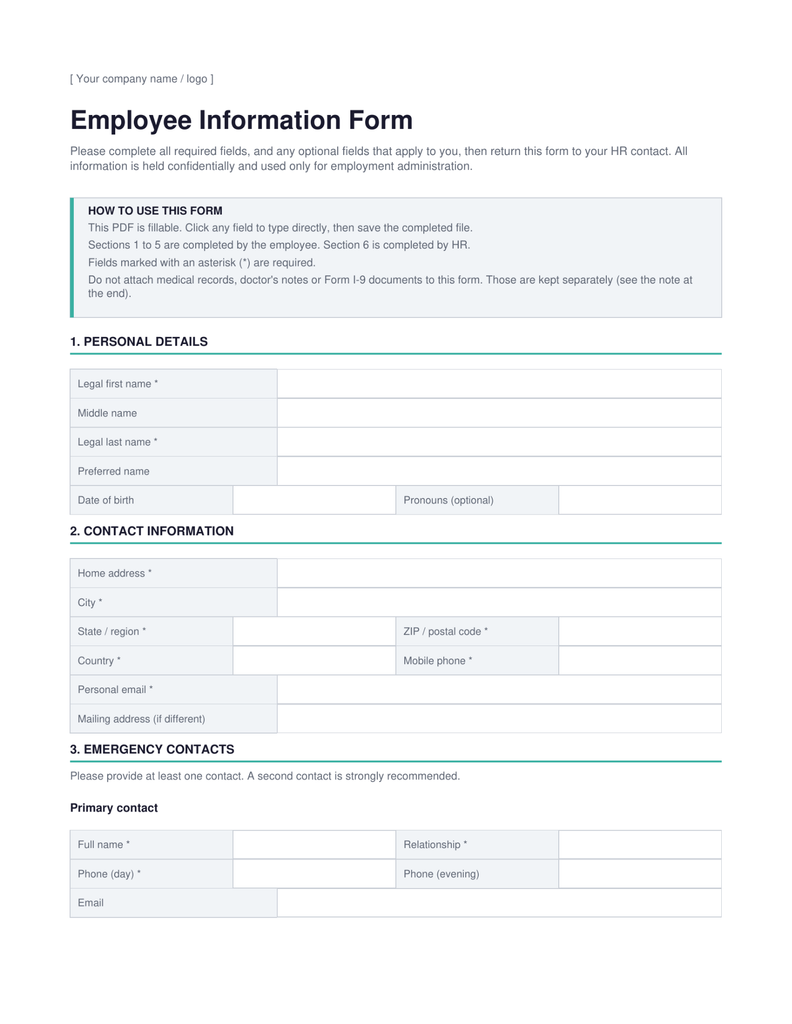
You can download our free employee information form template in three formats below. Use the fillable PDF if you want employees to type straight into the form, the Word version if you want to change the fields first, or the Excel register if you are tracking a whole team in one place.
All three collect the same core information. Pick the one that matches how your team already works.
Format
Best for
What you get
Fillable PDF
Sending to a new employee to complete on screen
46 form fields you can click and type into, then save. No printing required.
Word document
Editing the fields before you send anything out
The same form, fully editable. Opens in Word and Google Docs.
Excel register
Holding basic information for a whole team in one sheet
One row per employee across 23 columns, plus an example tab and a field guide.
Each file also includes a reference table showing where each piece of information should be stored, which is what matters most once the form comes back.
An employee information form is a document that collects the key information an employer needs about an employee, including their personal information, contact details, emergency contact information, and job information.
You will see the same document called an employee information sheet, an employee details form, an employee data sheet, or simply an employee form. The name changes; the job does not. It gives you one structured place to capture necessary information about every person who works for you, instead of chasing it one message at a time.
Most companies hand a new employee information form to each new hire during employee onboarding, usually in the first week. Some also send it out once a year so people can confirm their details are still correct.
It helps to be clear about what this document is not. It is not a legal form in the way that Form W-4 or Form I-9 are. Those are government forms with their own completion rules, deadlines, and retention requirements. Unlike standard government forms, companies can tailor an employee information form to their own administrative needs, subject to applicable privacy and employment laws. That flexibility is exactly why the fields are worth thinking about.
It also sits alongside the other forms most HR teams standardise over time, such as job application forms, a time off request form, an employee evaluation form, a training form and a complaint form. The employee information form is usually the first one a company builds, because everything else assumes the basic information already exists.
What information should an employee information form include?
A basic employee information form should include personal information, contact information, emergency contact information, and job information. Anything beyond those four groups should earn its place by serving a purpose you can name.
Here is what each section does, and who typically needs to see it. Access always depends on your own policy and on local law, but that last column is the one most teams never think about, and it is the reason employee information forms cause problems later.
Section
What it captures
Why you need it
Typical access
Personal information
Legal first and last name, preferred name, date of birth where there is an administrative need
Matching records across payroll, benefits and IT systems
HR, and payroll where name matching is required
Contact information
Home address, personal email, mobile phone, mailing address if different
Reaching the employee, sending documents, tax and payroll records
HR; managers only where there is a defined business need for specific fields
Emergency contact information
Name, relationship and phone number for at least one contact, ideally two
Reaching someone quickly if an employee is injured or falls ill at work
HR, plus whoever runs the on-site emergency process
Org structure, approvals, reporting lines and headcount planning
HR, managers, and often the whole company through a directory
A few notes on the fields people get wrong.
Collect two emergency contacts, not one. One phone number that nobody answers is the same as no emergency contact form at all. Ask for the relationship too, because knowing you are calling a spouse rather than a former flatmate changes the conversation.
Ask for a preferred name. Legal names are needed for payroll processing and official records. The name a person actually uses belongs in your directory. They are often not the same, and collecting only one creates a problem you fix by hand later.
Keep employment history off the form. Employment history belongs in the hiring file from the application stage. Repeating it here means maintaining the same employee data in two places, and the two will drift apart.
Add a record last reviewed field. One field showing when the record was last checked tells you at a glance which records you can still trust. The Excel register has this as a column. The PDF and Word forms capture it through the date entered and review due date fields in the HR section.
What information should you keep off a general employee information form?
Keep tax identifiers, bank details, medical information, and employment eligibility verification off your general employee information form. These belong in separate records with tighter access, not in a document that circulates by email and sits in an inbox.
This is not about avoiding the information entirely. An employer genuinely needs some of it. It is about collecting it once, in the right place, so that fewer people end up holding sensitive employee information they never needed.
Tax identifiers and payroll details
Collect tax identifiers and bank details on a separate payroll form, not on the general employee information form.
Employers in the US do need an employee’s name and Social Security number for wage reporting, and new hires complete Form W-4 so the right tax is withheld. None of that requires the number to also sit on a general form a manager might open. Collect it once, through payroll, and store it where access is limited to authorised HR and payroll personnel.
Employment eligibility verification
Form I-9 is a separate process with its own document, not a section of your employee information form.
Employment eligibility verification has its own timing rules and its own retention period. USCIS recommends keeping completed Form I-9 records separate from personnel records, so that they can be produced on their own if the forms are ever inspected. Mixing them into the general file makes an inspection harder than it needs to be.
Medical and health information
Medical information should be kept confidential and maintained separately from general personnel records.
Where the Americans with Disabilities Act applies, employee medical information must be treated as confidential and kept separately from the general personnel file, and the same separation is expected for electronic records held in a database. A note about an allergy or an accommodation does not belong in a form that circulates for routine administration.
Details that need a reason
Date of birth, nationality and marital status should only be collected when you can point to a specific administrative need for them.
Each of these is genuinely required by some companies for some purposes, such as benefits eligibility or age-related entitlements. None of them is required by default. If you cannot say what a field is for, leaving it off the form is the safer choice, and it shortens the form for everyone.
Here is the full picture in one table.
Information
On the general form?
Where it should be stored
Name, address, personal contact details
Yes
Employee record
Emergency contacts
Yes
Employee record
Job title, department, start date, manager
Yes
Employee record
Tax identifiers such as an SSN
Only where required, and only once
Restricted HR or payroll record, with access limited to authorised HR and payroll personnel
Bank and direct deposit details
Only where required
Payroll system, with access limited to authorised payroll personnel
Medical and health information
Generally not
Confidential medical file or database, kept separately from the personnel record
Form I-9 and identity documents
No, use the separate I-9 process
A separate I-9 record set, as recommended by USCIS
Date of birth, nationality, marital status
Only where there is a stated administrative need
Employee record, collected for that purpose only and not by default
This guide is general information rather than legal advice. Requirements vary by country and by state, so check anything specific with your own adviser.
Completed employee information form example
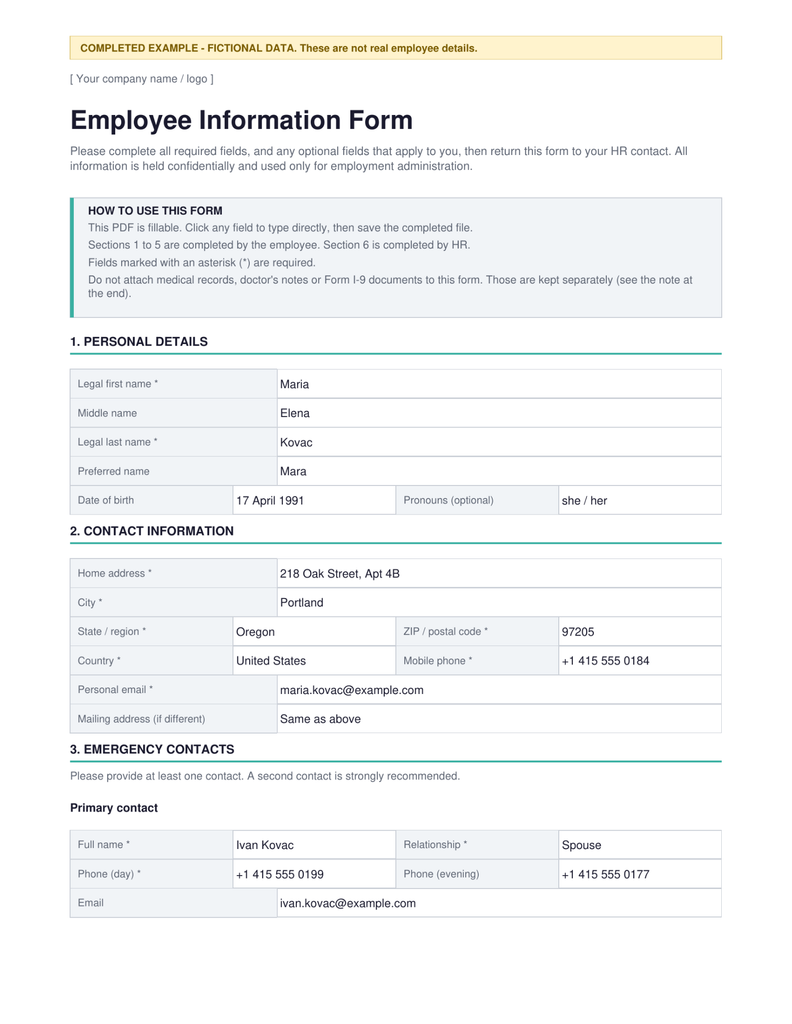
A blank template only takes you so far. The completed employee information form example below shows what a properly filled form looks like, using entirely fictional data.
Download it alongside the blank version and use it when you brief a new employee. Four things in it are worth copying.
Both emergency contacts are filled in. A primary and a secondary, each with a relationship and a working phone number.
The mailing address says “same as above” rather than being left blank. An empty field is ambiguous. You cannot tell whether the employee skipped it or whether it genuinely does not apply.
The HR section is completed with real dates. Received, entered into the system, verified, and a review date a year out. That turns the form into a record of a process, not just a pile of information.
The notes field says the payroll form and Form I-9 were handled separately. One line, and anyone picking up the file later knows those steps happened and where to look.
What should happen to employee data after the form is completed?
Once the form comes back, the information needs to move into asingle employee recordwith controlled access, a clear owner, and a way to see what changed. A completed form sitting in an inbox is a bigger problem than the one it solved.
This is the step almost every article on employee information forms leaves out, and it is where the risk actually lives. The form is easy. Handling what it collects is the hard part.
Move it into one employee record
Transfer the information into a single employee record as soon as the form arrives, then stop treating the form itself as the source of truth.
If the completed PDF is the only copy, then finding an employee’s phone number means searching an inbox. Every update means a new file, and nobody can tell which version is current. The form is a collection tool. The employee record is where the information lives.
Different parts of an employee record need different audiences, so access should be set by role rather than by file.
Different roles need different subsets of the same record. A manager usually needs job information and work contact details, and rarely needs a home address. Payroll needs whatever the pay run and reporting require, which is a different set again.
When everything sits in one document or one shared spreadsheet, anyone who can open it sees all of it, which is the underlying reason spreadsheets stop working as a team grows.
Handle sensitive employee information separately
Sensitive employee information should live in its own record with its own access list, not in the general file.
Tax identifiers, bank details, and anything medical each need a smaller audience than a job title does. Keeping them apart means an audit or a data request touches a much smaller surface, and far fewer people hold information they had no reason to see.
Keep a record of what changed
You should be able to answer who changed a field, when, and what it said before.
Addresses, managers, job titles, and emergency contacts change constantly. Without a change history, you are relying on memory, and memory does not hold up when someone asks why a record says what it says.
How to keep employee information up to date
Employee information goes out of date faster than most teams expect. Set one annual review, and make it easy for employees to report a change themselves instead of filling in a whole new form each time.
The details most likely to change are the ones you need most in a hurry: a phone number, a home address, an emergency contact after a relationship changes, a legal name, and job information after a promotion. Two habits keep them accurate without creating work.
Review once a year. Ask every employee to confirm their details are still correct, and record the date they confirmed. That is what the record last reviewed column in the register is for.
Let people update their own details. Chasing a signed form for a new mobile number is more effort than it is worth, for both sides. When employees can update their own contact information directly, records stay current without anyone having to remember.
How Thrivea helps manage employee information
Thrivea gives you oneemployee recordper person, with custom fields, role-based access, and employee self-service, so the information you collect on this form stops being lost in spreadsheets.
A template gets you started. At some point, the collection problem becomes a maintenance problem, and that is what a proper employee record system is for. If you are still comparing options, we go through them in our guide to employee record management software.
One employee record per person
Every employee has a single profile holding their personal information, contact details, emergency contacts, job information, and documents. Instead of a folder of completed forms, you get one record you can search.
Custom fields without IT
The employee record builder lets you add the fields your organisation actually needs, so you are not forced to work around a fixed template.
Role-based and field-level permissions
Access is set by role, and permissions go down to individual fields. A manager can see the job information they need without seeing a home address. This is the thing a spreadsheet fundamentally cannot do.
Employee self-service
Employees can view and update their own details within the permissions you set, which keeps contact information and emergency contacts current without HR chasing anyone.
Import what you already have
If you have been running an employee register in a spreadsheet, you can import it rather than retyping it, and export filtered data whenever you need it for reporting.
From employee information form to employee record
The form is the easy part. What decides whether this still works six months from now is where the information lives, who can see it, and how it stays current.
Download the template, adapt the fields to your organisation, and send it to your next new hire. That solves collection today.
What it does not solve is everything after. Completed forms pile up in an inbox. Someone updates a phone number in one place and not the other. A manager ends up holding a home address they never needed. None of that is a template problem, and no version of this form fixes it.
Thrivea gives every employee one record instead: personal information, contact details, emergency contacts, job information and documents in a single place, with access set by role and employees able to keep their own details up to date. If you are still running employee information in a spreadsheet, this is the point where it stops scaling.
It gives an employer one structured way to collect the same key information from every employee, including contact details, emergency contact information, and job information. It is used during employee onboarding and updated whenever details change.
Who should fill out an employee information form?
The employee completes it, usually in their first week. HR completes the final section confirming when the form was received, entered, and verified.
Is an employee information form a legal form?
No. It is a business form your company designs. Form W-4 and Form I-9 are the government forms with their own rules, and they are completed separately.
Should the employee emergency contact form be separate?
It can be either. Our template includes emergency contacts as a section, which means one form to chase. A separate employee emergency contact form makes sense if you update contacts more often than the rest of the record.
What is the difference between an employee information form and an employee information sheet?
Nothing. The two names describe the same document, along with employee details form and employee data sheet.
How often should employee information be updated?
Review it once a year, and update it immediately whenever something changes, such as an address, a phone number, or a reporting manager.
Create your account and explore the full platform — no
credit card, no sales call.
Want a tailored walkthrough? Our team will show how
Thrivea fits your workflows and scales with you.
Losing employees is normal. Losing them faster than you expected, or losing them in patterns you never noticed, is a problem. Attrition rate is the HR...
Most companies have HR managers. Fewer have an HRBP, and the difference matters more than most people realize. An HR Business Partner (HRBP) isn't jus...
Discover which HR metrics to track across every major category, what each one signals, and what it looks like when something is off, so your HR team c...
Do you have
any questions?
Feel free to send us your questions or
request a free consultation.